I’m back with another round of my Same Prompt, Different Tools experiment!
This time, I’m testing Articulate Rise, an eLearning authoring tool that’s already familiar to a lot of instructional designers. See previous posts to read about my experience with Mindsmith, Claude Design, and Genially.
If you haven’t been following along, I’m giving different AI tools the same learning problem, source material, and basic requirements to see what they create. I’m intentionally not telling them what kind of learning experience to build or what instructional strategies to use. Then I look at the instructional decisions they made, what worked (and what didn’t), and how accessible the result is.
This is just a fun experiment to satisfy my curiosity, not a formal study. I’m skipping most of the instructional design process, and I’m interested in what these tools produce with relatively little direction.
The Prompt
I gave each tool the same general prompt and source material. Keep in mind, this is skipping most of the instructional design process. This is all hypothetical so I could keep the scope fairly narrow. I found this OSHA document on Heat Illness Prevention, and decided to narrow it down to landscaping-related work environments.
Here is the exact prompt that I pasted into each tool:
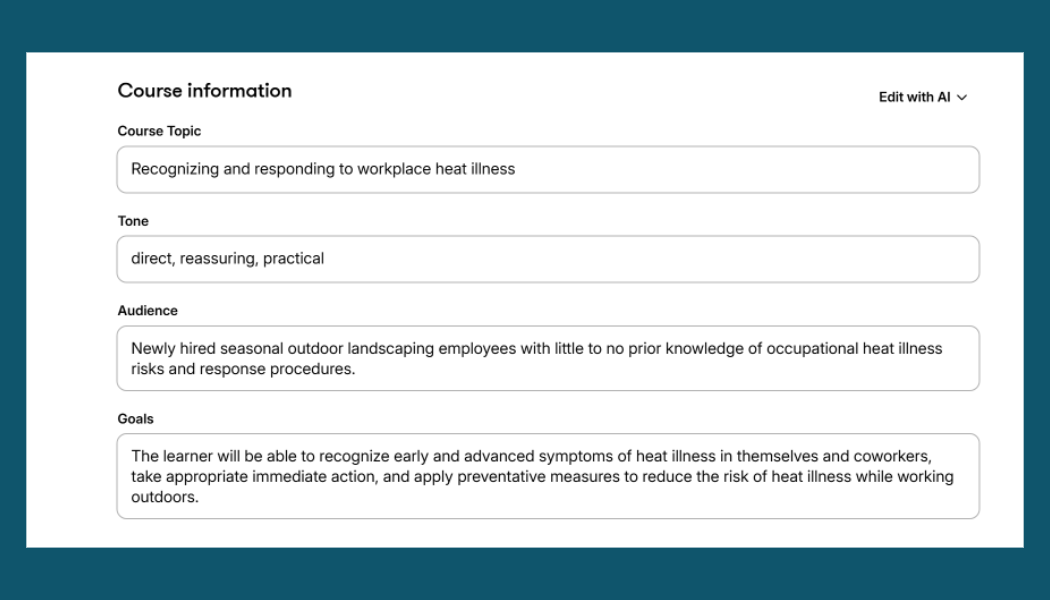
“Create a 10–15 minute digital learning experience for newly hired seasonal employees at a landscaping company who will be working outdoors in hot weather.
Employees receive information about heat safety, but supervisors have found that new employees do not consistently recognize signs of heat illness or know how to respond appropriately when they or a coworker begins experiencing symptoms.
Use the provided OSHA document, Protecting Workers from the Effects of Heat, as the source material. The learning experience should prepare employees to apply this information and make appropriate decisions when they encounter potential heat illness on the job.
The learning experience must conform to WCAG 2.2 Level AA.
Use a clean, professional visual style appropriate for the audience, with a color palette inspired by the provided OSHA document.”
I didn’t give any more instruction unless I was specifically asked questions that I needed to answer in order for the tool to move forward.
About Articulate Rise
rticulate Rise is a web-based eLearning authoring tool that’s part of the Articulate 360 suite. It uses a block-based approach to course creation, with prebuilt layouts for text, images, videos, interactive activities, and assessments. Courses are responsive, meaning they automatically adapt to different screen sizes.
Rise also includes an AI Assistant that can generate course drafts from prompts and source documents, create content and knowledge checks, and help revise existing material. For this experiment, I used the AI course generation feature to see what it would create with the same prompt and OSHA document I provided to the other tools.
Rise isn’t available as a standalone personal subscription. It’s included with Articulate 360 AI, which currently costs $1,449 per year for an individual subscription, or $1,749 per user per year for Teams. There’s no monthly subscription option, so you’re committing to at least a full year. That’s a pretty significant investment, especially if you’re an individual developer who only needs Rise. And they recently brought their 30-day free trial down to only 14 days, if you were looking to try it out.
Articulate has also been the subject of considerable discussion in the eLearning community lately. I’m going to set that aside for this post and focus on the tool itself, how it handled my prompt, and what it actually produced.
How Rise Handled the Prompt
Initial Questions
Rise asked me if I wanted text and interactive content, or just a text course. I’m wondering if people maybe select text only and then use the text and choose their own interactive blocks to plug it into? I say that now, only because I know what happened when I selected text and interactive. We’ll get to that soon.
It asked if I wanted AI images or a quiz, both in beta mode. I did not opt in for either of those.
Course Length
I then had to choose if I wanted a single lesson that was under 5 minutes, a short course that is 1-3 lessons and under an hour, a standard course that is 4-8 lessons and 1-2 hours, or an extended course which is 8 or more lessons and 3 or more hours. Has anyone chosen extended course? I guess if it was truly a course a learner was working through over time… but then I don’t think I would ever be using Rise for that. I would love some input if I’m missing something.
I chose 1-3 lessons, less than an hour.
Learning Objectives
The learning objectives created by Rise were:
- Identify common signs and symptoms of heat illness, from mild to sever.
- Describe immediate actions to take when symptoms os heat illness are recognized in oneself or a coworker.
- Demonstrate the correct proceudre for contacting emergency services in a heat-related emergency situation.
- List as least three job-appropriate practices to prevent heat illness during outdoor work.
I personally would have worded them to fit actions on-the-job more, but it makes sense to me that Rise wrote them to fit this course. No one is calling 911 while taking the course (I hope…).
The Course
I evaluated Rise’s course using the same criteria I’ve used for the other tools in this experiment. Remember, I intentionally skipped most of the instructional design process and gave the AI very little direction. I wanted to see what decisions it would make on its own.
Overall, the course was… okay. Nothing was particularly bad, but nothing really stood out, either. I’ll highlight a few of my observations below, but overall, the “out-of-the-box” course scored 14/30 using my self-created criteria. In fairness, this may have gone up a little if I selected to include a quiz.
Content Selection & Performance Alignment: The course covered relevant information from the OSHA document, and the learning objectives were appropriate. However, the learning experience focused heavily on presenting information rather than giving employees opportunities to practice recognizing symptoms and responding to heat illness on the job.
Content Accuracy: No hallucinations! The information was accurate and consistent with the provided OSHA document.
Cognitive Load: Rise relied heavily on the same layouts and interactions throughout the course. Each lesson followed a similar format, and it felt like the AI was simply distributing information among the available blocks without considering how the presentation affected understanding. While the consistency can help with cognitive load, the information wasn’t placed in blocks that really made sense in context which can have a negative effect of cognitive load.
One example was the use of carousels to present related information. In some cases, it would have been much more useful to see everything together so learners could understand the relationships between different pieces of information. Instead, they had to navigate back and forth between slides.
Instructional Strategies: There were plenty of interactions, but I wasn’t convinced they added any instructional value. Clicking through a carousel or opening a tab doesn’t necessarily make something more engaging or effective. Sometimes those interactions serve a purpose. Other times, they’re just another way to display text.
And that’s what much of this course felt like: walls of text presented in different “interactive” formats.
The original performance problem wasn’t that employees lacked access to information about heat illness. It was that they weren’t consistently recognizing symptoms or responding appropriately. I would have liked to see more opportunities to practice those decisions in realistic situations.
Ultimately, I wasn’t convinced this learning experience offered anything more than a well-organized document on the same topic.
Accessibility
Accessibility was one of Rise’s strengths in this experiment.
I tested the course using a keyboard and VoiceOver, and overall, it performed very well. I didn’t encounter the significant accessibility issues I’ve found in some other tools.
I did struggle with one of the tab interactions. I initially had trouble navigating to and reading the content associated with each tab, but I couldn’t confidently determine whether this was a problem with Rise or how I was navigating with VoiceOver and trying to enter the interaction. I’m not going to count something as an accessibility failure when I can’t verify that it’s actually broken.
Overall, I was pleased with Rise’s accessibility. Its built-in interactions generally worked as expected, and the course was navigable without encountering major barriers.
Of course, accessible components don’t automatically guarantee an accessible course. Developers still need to make thoughtful content decisions and test the finished experience.
Using Rise in Practice
Rise is clearly capable of creating clean, consistent, and accessible eLearning quickly. I can see why it’s a popular choice for instructional designers, particularly when they need to develop and publish courses efficiently.
But I wasn’t particularly impressed with what its AI created on its own.
The course was functional. The content was accurate. The learning objectives were appropriate. The lessons were organized, and there were plenty of interactive components.
It checked a lot of boxes.
What it lacked was thoughtful instructional design.
The AI seemed more interested in filling the available blocks with information than choosing instructional strategies that would help learners apply what they were learning.
That’s not necessarily a limitation of Rise itself. An instructional designer can use the same components to create a much more effective experience by making intentional decisions about content organization, practice, and feedback.
But that wasn’t the point of this experiment. I wanted to see what Rise would create when I gave it a performance problem and let it make those decisions.
And the result was pretty lackluster.
The Bigger Accessibility Takeaway
My takeaway from Rise is a little different from some of the other tools I’ve tested.
From an accessibility standpoint, Rise performed very well. Its built-in components generally worked with keyboard and screen reader navigation, and I didn’t encounter significant barriers during my testing. I also didn’t have any images or quizzes, so I can’t comment on that for this particular project.
But this experiment also reinforced an important distinction: An accessible course isn’t necessarily an effective learning experience.
The content was accurate, organized, and accessible. But the interactions often seemed to exist simply because the tool had them available, not because they helped learners understand or apply the information.
And accessibility isn’t just about whether someone can operate an interaction. It’s also worth considering whether that interaction makes the content easier or harder to understand.
A carousel might be completely keyboard accessible and work perfectly with a screen reader, but that doesn’t mean it’s the best way to present information that learners need to compare.
Sometimes a simple paragraph, list, or table is a better choice.
I don’t want AI to create interactions just for the sake of having interactions. I want it to consider what learners actually need to do and choose approaches that support that goal.
Rise produced an accessible, functional course. But it didn’t convince me that its AI was making particularly thoughtful instructional decisions.
And that’s a pretty important distinction when we’re asking AI to do more than simply organize information.
What’s Next?
What should I test next? Give me your suggestions and I’ll try out any that I can – if I have a subscription or they offer free trials, of course!
Leave a Reply